Unicode Text Converter and Fancy Text Generator
Transform normal text into stylish Unicode characters with this online Unicode text converter. Enter your text, choose from bold, italic, script, circled, Fraktur, monospace, small caps, superscript and other styles, then copy the result instantly.
These styles use Unicode characters rather than downloadable fonts, so you can paste them into social media bios, usernames, messages, profiles and documents. You can also change letter case, reverse text, flip text and apply decorative effects such as underline or strikethrough.
Table of Contents
What is a Unicode Text Converter?
A Unicode text converter, also called a fancy text generator or Unicode font generator, maps normal letters to stylized Unicode characters. Instead of installing a font, each letter is replaced by a visually similar character from blocks such as Mathematical Alphanumeric Symbols, Enclosed Alphanumerics and other Unicode ranges.
Common uses include:
- Instagram, TikTok and Facebook bios
- Discord, Steam and gaming usernames
- WhatsApp and messaging app status text
- YouTube titles and channel descriptions
- Decorative headings, labels and short captions
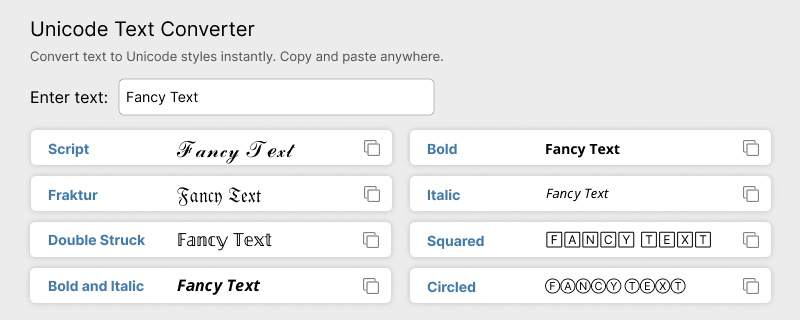
Unicode Text Converter
Enter your text once and get every Unicode style below in one list. This fancy text generator creates bold, italic, script, circled, Fraktur, monospace, small caps, fullwidth, superscript, subscript and other decorative outputs, plus letter case, backwards text, reverse words, upside-down flip, underline, overline and strikethrough results.
Copy or share any row instantly. Conversion runs in your browser, so your text is not uploaded to a server.
𝐅𝐚𝐧𝐜𝐲 𝐓𝐞𝐱𝐭
ℱ𝒶𝓃𝒸𝓎 𝒯ℯ𝓍𝓉
𝔉𝔞𝔫𝔠𝔶 𝔗𝔢𝔵𝔱
𝔽𝕒𝕟𝕔𝕪 𝕋𝕖𝕩𝕥
𝙵𝚊𝚗𝚌𝚢 𝚃𝚎𝚡𝚝
ғᴀɴᴄʏ ᴛᴇxᴛ
Ⓕⓐⓝⓒⓨ Ⓣⓔⓧⓣ
🄵🄰🄽🄲🅈 🅃🄴🅇🅃
🄕⒜⒩⒞⒴ 🄣⒠⒳⒯
ᶠᵃⁿᶜʸ ᵀᵉˣᵗ
Fancy Text
Fₐₙcy ₜₑₓₜ
Letter Case Converter
Change the letter case of plain text without applying Unicode styling. Use this tool for uppercase, lowercase, title case and random case conversions.
Available case options:
- UPPERCASE - converts all letters to capitals
- lowercase - converts all letters to small letters
- Title Case - capitalizes the first letter of each word
- rAnDOm CaSe - mixes upper and lower case randomly
Text Backwards and Mirror Text Generator
Reverse the order of characters in a string so the last character becomes first. This tool is also called a mirror text generator because the output reads like the original text reflected in a mirror, one character at a time.
Use it for puzzles, hidden messages, playful social posts and usernames. This is not the same as the word-order reverse tool, which reverses word order, or the flipped Unicode letter styles, which replace normal letters with upside-down characters.
Example:
- Input:
Hello, World! - Output:
!dlroW ,olleH
Reverse Text Generator
Reverse the order of words while keeping each word readable. Unlike the Text Backwards, this tool flips word order rather than individual characters.
Example:
- Input:
Reverse Text - Output:
Text Reverse
Upside Down Text Generator
Flip text upside down by replacing characters with inverted Unicode equivalents and reversing the string order. This creates playful social posts and hidden-message effects.
Example:
- Normal text:
Flipped Text - Flipped text:
ʇxǝꓕ dᴉʅᖴ
Underline Text Generator
Add an underline to each character using Unicode combining marks. This is useful when the target platform does not provide a built-in underline formatting option.
Example:
- Normal text:
Underline Text - Underlined text:
U̲n̲d̲e̲r̲l̲i̲n̲e̲ T̲e̲x̲t̲
Overline Text Generator
Draw a line above each character using Unicode combining overline marks. Use this style for math-style notation, labels or decorative emphasis.
Example:
- Input:
Overline Text - Output:
o̅v̅e̅r̅ l̅i̅n̅e̅ t̅e̅x̅t̅
Strikethrough Text Generator
Add a horizontal line through the center of each character to create strikethrough text. This is commonly used for sale prices, edits, jokes and redacted-looking messages.
Example:
- Input:
Strike through Text - Output:
S̶t̶r̶i̶k̶e̶ t̶h̶r̶o̶u̶g̶h̶ T̶e̶x̶t̶
How to Use
Follow these steps to convert plain text into fancy Unicode characters with the tools on this page.
- Enter or paste your text into the input field of the generator you want to use.
- Choose a Unicode style, case option or decorative effect.
- Click Convert to generate the styled output.
- Click Copy Text and paste the result into your target app or website.
- Preview the pasted text on the platform where it will appear.
Popular Unicode Text Styles
This page includes multiple Unicode generators. The table below summarizes the most popular styles, what they look like, and where they work best.
| Style | Example | Best for |
|---|---|---|
| Bold | 𝗕𝗼𝗹𝗱 | Emphasis in bios, posts and usernames |
| Italic | 𝐼𝑡𝑎𝑙𝑖𝑐 | Stylish captions and short phrases |
| Script | 𝒮𝒸𝓇𝒾𝓅𝓉 | Aesthetic bios and decorative names |
| Fraktur | 𝔉𝔯𝔞𝔨𝔱𝔲𝔯 | Gothic or fantasy-style usernames |
| Circled | Ⓒⓘⓡⓒⓛⓔⓓ | Labels, step numbers and playful text |
| Small caps | ꜱᴍᴀʟʟ ᴄᴀᴘꜱ | Compact headings and branded labels |
| Monospace | 𝙼𝚘𝚗𝚘 | Code-like usernames and tech themes |
| Fullwidth / wide | Fullwidth | Vaporwave aesthetic and spaced-out text |
| Superscript | ˢᵘᵖᵉʳ | Footnotes, powers and compact labels |
| Subscript | ₛᵤᵦ | Math and chemistry-style notation |
Where Can You Use Unicode Text?
Unicode text can be used anywhere the platform accepts Unicode characters and renders them with a compatible font. These are the most common places people paste converted text.
- Social media bios - Instagram, TikTok, Facebook and X profiles
- Messaging apps - WhatsApp, Telegram, Discord and Slack
- Gaming platforms - Steam, Minecraft and other username fields
- Video platforms - YouTube titles, descriptions and comments
- Documents and notes - Google Docs, Notion and plain-text editors
Appearance can vary by platform, operating system and device. Preview important text before publishing it, especially for usernames, contact details or brand names.
Compatibility and Accessibility
Styled Unicode characters are not conventional fonts. They are separate characters that visually resemble bold, italic or decorative letters. Keep these points in mind before using converted text in public profiles or important content.
- Some devices may not support every Unicode character and may show boxes or fallback glyphs.
- Screen readers may pronounce stylized characters differently from normal letters.
- Search engines and some apps treat stylized characters as distinct symbols, which can affect matching.
- Combining marks used for underline, overline and strikethrough may clip in tight user interfaces.
Use decorative Unicode text for short phrases rather than essential information, long paragraphs or important contact details.
Frequently Asked Questions
Answers to common questions about Unicode text conversion, compatibility and copy-paste usage.
What is a Unicode text converter?
A Unicode text converter transforms normal letters into stylized Unicode characters such as bold, italic, script, circled, Fraktur, monospace, superscript and subscript. The output is plain text you can copy and paste into supported apps and websites.
Are Unicode fonts real fonts?
No. Unicode fancy text uses special characters from the Unicode standard, not installed fonts. That is why the styled text can be pasted into social media bios, messages and usernames without uploading a font file.
Can I copy Unicode text to Instagram or WhatsApp?
Yes. Instagram bios, TikTok profiles, Facebook posts, WhatsApp messages, Discord usernames and many other platforms support common Unicode styles such as bold, italic, script, circled and small caps. Always preview the result on the target platform before publishing important text.
Why do some Unicode characters appear as boxes?
A box or question mark usually means the device, app or font does not support that Unicode character. Bold, italic, script and circled styles are widely supported, while some decorative or combining-character styles may not render on older devices.
Does Unicode text work on every device?
Most modern phones, tablets and browsers support popular Unicode text styles, but rendering can vary by platform. Test short phrases on the device or app where you plan to use the text.
Is Unicode text accessible to screen readers?
Screen readers may read stylized Unicode characters differently from normal letters. Use decorative Unicode text for short display phrases, not for essential information, long paragraphs or important contact details.
Can Unicode text affect search or usernames?
Search engines and some platforms treat stylized Unicode characters as distinct symbols. They can make a username or bio stand out visually, but they may not help keyword matching and can reduce readability in some systems.
Is the text I enter stored or uploaded?
Conversion happens in your browser. Your input text is not sent to a server for processing, so you can use the tool for usernames, bios and messages without uploading your content.
Is Unicode text supported everywhere?
No. Popular styles such as bold, italic, script and circled text work on most modern browsers, phones and social apps, but support varies by platform. Some sites remove certain Unicode characters, and older devices may not render decorative styles correctly.
Why does my styled text appear as squares?
Square boxes usually mean the app, website or device font does not include that Unicode character. Widely used styles rarely cause this problem, but combining marks, rare symbols and some decorative characters may appear as squares on older systems.
Can I use Unicode text in usernames?
Often yes. Many gaming platforms, Discord, Instagram, TikTok and similar services allow Unicode characters in usernames and display names. Platform rules vary, and some sites block certain Unicode ranges, so test the username where you plan to use it.
Does Unicode text affect SEO?
Yes, it can. Search engines may not treat stylized Unicode letters as the same as normal Latin keywords. Using fancy Unicode text in page titles, headings or important content can reduce keyword matching and make snippets harder to read.
Is Unicode text searchable?
Usually not in the same way as normal text. A search for hello may not match 𝗵𝗲𝗹𝗹𝗼 because the characters use different Unicode code points. Exact matches can still be found if someone searches for the styled text itself.