Download Country Flag Images and Icon Sprites
Create country flag images for websites, apps, language switchers, and forms. Select the countries you need, choose single-flag download or one combined icon image, lock a 4:3 or 16:9 aspect ratio, set width and height, then generate and download the result.
Use this page when you need resized PNG flag icons, a zip of individual flags, or a sprite sheet with ready HTML and CSS that map each ISO class to a background-position on one image file.
Table of Contents
What is a Country Flag Icon Generator?
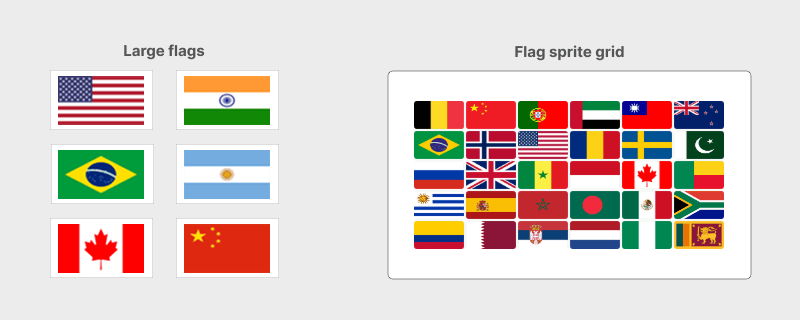
A country flag icon generator turns a list of selected countries into resized flag images you can use in UI components. Instead of hunting for matching assets one by one, you pick the countries, set the output size, and export either separate files or one combined sprite.
Two output styles cover most projects:
- Individual flag images for galleries, downloads, or per-country assets
- One icon sprite with every selected flag in a single image for menus and selectors
- Generated HTML and CSS that map each ISO class to a sprite cell with background-position
Jump to the country flag generator when you are ready to select countries and create images.
Country Flag Generator
Use the generator below to select countries, choose single flags or a combined icon image, set aspect ratio and size, then generate and download country flag images. See the feature list below for each control, and the how-to steps for the recommended order.
Select country names
| # | ISO | Name | Continent | |
|---|---|---|---|---|
| 1 | AF | Afghanistan | Asia | |
| 2 | AX | Aland Islands | Europe | |
| 3 | AL | Albania | Europe | |
| 4 | DZ | Algeria | Africa | |
| 5 | AS | American Samoa | Oceania | |
| 6 | AD | Andorra | Europe | |
| 7 | AO | Angola | Africa | |
| 8 | AI | Anguilla | North America | |
| 9 | AQ | Antarctica | Antarctica | |
| 10 | AG | Antigua and Barbuda | North America |
Select Image Type
Choose output format
Set Image Size
Aspect Ratio
Lock width and height
Limits depend on image type. Icon sprite mode keeps smaller dimensions.
Generate
Sprite preview
Sprite layout
Flag code
Paste into your page after flag-icons.png is in place.
HTML markup with flags_img and iso_XX classes.
Sprite CSS with ISO background-position values for flag-icons.png.
After generation in icon mode, the preview area shows the combined canvas. Adjust layout settings, then copy HTML and CSS from the Flag code section for ISO-based sprite classes, use Download Image for the PNG alone, or Download zip for the image plus HTML and CSS in one archive. See HTML and CSS sprite code for a sample of the generated output.
Features
The controls on this page cover bulk selection, flag style, output type, sizing, layout, and export. These are the main options available while you build flag images.
- Select country names: Choose from the full list, filter by continent (Africa, Antarctica, Asia, Europe, Australia, North America, South America), search by name, or check and uncheck rows as needed.
- Paste country codes: Open the paste dialog and bulk-select countries from a JavaScript array (for example
['US', 'GB', 'DE']), a line-separated list with one ISO code per line, or a delimited string such as CSV with comma, colon, semicolon, tab, or a custom separator. Only valid codes are applied to the table; invalid entries are reported before you click Apply. - Flag style: Choose wavy flags with a rippled wave effect or flat flags with a standard rectangular look before you generate single-flag downloads or an icon sprite.
- Shuffle country order: Randomize the order countries appear in the sprite grid. ISO class names such as
iso_USstay the same; only each flag's position on the canvas changes. - Select Image Type: Download single flag for separate resized images, or create icon flags to place all selected country flags in one image.
- Keep ratio: Lock width and height to a 4:3 or 16:9 aspect ratio, or turn the lock off for custom dimensions.
- Set image size: Enter width and height for each flag. Limits differ for single-flag and icon modes so sprites stay small and single downloads can be larger.
- Generate image: Build the resized flags or the combined icon canvas from your selection.
- Auto-fit grid: After icon generation, let the tool calculate rows and columns from the number of selected countries instead of setting them manually.
- Globe Icon: Show a globe placeholder for countries that do not have a flag image in the sprite preview.
- Export PNG, zip, and JSON: Download the generated PNG only, a zip archive with
flag-icons.pngplus matching HTML and CSS files, or a JSON file with sprite positions and country metadata for React, canvas, and other app workflows. - Flag code: After icon generation, copy HTML and CSS from the Flag code section. The output uses one sprite file (
flag-icons.png) with classes such asflags_imgandiso_AF, each with the correctbackground-positionfor that country.
How to Use This Tool
Follow these steps to create country flag images with the options on this page.
- Select the country names you want. Use the continent filter or search box, then check only the rows you need.
- Select Image Type: Download single flag for separate files, or create icon flags for all selected flags in one image.
- Optionally enable Keep ratio and choose 4:3 Aspect ratio or 16:9 Aspect ratio.
- Set image size by entering width and height within the limits for your chosen image type.
- Generate the image. Use Download Image for the PNG only, Download zip for image + HTML + CSS in one file, or copy HTML and CSS from the Flag code section without downloading.
Image Types Explained
Image Type controls whether you get many separate files or one sprite. Pick the mode that matches how you will use the flags in your project.
| Image type | Best for | What you get |
|---|---|---|
| Download single flag | Per-country assets, downloads, and large display sizes | Resized flag files packaged for download (zip) |
| create icon flags | Menus, language pickers, and compact UI icons | One canvas image plus HTML and CSS with per-country iso_XX background positions |
Icon mode works with one or more selected countries, but a grid of four or more flags usually gives a more useful sprite layout. Single-flag mode works when you only need one country or a small set of separate files.
Aspect Ratio and Image Size
Keep ratio and Set image size work together. When the ratio lock is on, changing width or height updates the other side so flags stay proportional.
- 4:3 Aspect ratio: A common flag-like shape for compact icons and list items.
- 16:9 Aspect ratio: A wider frame when you want landscape-style thumbnails.
- Turn Keep ratio off when you need a custom width and height that do not match those presets.
Size limits depend on Image Type. Icon mode keeps each flag small (roughly 15px to 100px wide) so the combined sprite stays manageable. Single-flag mode allows larger widths (roughly 15px to 1000px) for display or download assets. Height follows the same mode rules.
Sprite Layout Options
After you generate an icon sprite, the preview panel lets you refine how flags sit on the canvas before you download or copy code.
- Row and Columns: Control how many flags appear across and down the sprite grid.
- Row space and Col space: Add horizontal or vertical gaps between flag cells.
- Padding: Add space around the outer edge of the combined image.
- Radius: Soften flag corners with a rounded clip when you want softer icons.
- Preview Image Fit Size: Fit a wide canvas into the page so you can review the full sprite.
- Update: Rebuild the canvas after layout changes so positions stay in sync with the generated CSS.
- Flag code: Copy the generated HTML and CSS from the Flag code section. Each selected country gets an
iso_XXclass with a matchingbackground-positionon the shared sprite. - Download Image: Export only the generated PNG sprite when you already have your own HTML and CSS, or only need the image asset.
- Download zip: Export
flag-icons.pngtogether with the generated HTML and CSS in one zip so the full sprite package stays in sync.
Keep the total canvas under the maximum width and height limits shown by the tool. Very large grids can exceed the allowed image size; reduce rows, columns, or icon size if you see a size warning. After you change spacing or size, update the preview again before copying CSS or downloading the zip so positions stay accurate.
HTML and CSS Sprite Code
In create icon flags mode, the Flag code section builds ready-to-paste HTML and CSS that point at one sprite image. Each country uses a shared flags_img class plus an ISO class such as iso_AF that sets the exact background offset for that flag cell.
The HTML sample pairs a flag box with the country label. The CSS sample defines the flex row, the shared sprite size, and one rule per ISO code. Your live output updates to match the countries and layout you selected.
<div class="flex-box">
    <div class="flags_img iso_AF"></div>
    <div>Afghanistan</div>
</div>

<div class="flex-box">
    <div class="flags_img iso_AX"></div>
    <div>Aland Islands</div>
</div>

<div class="flex-box">
    <div class="flags_img iso_AL"></div>
    <div>Albania</div>
</div>

<div class="flex-box">
    <div class="flags_img iso_DZ"></div>
    <div>Algeria</div>
</div>.flex-box {
display: flex;
justify-content: start;
align-items: center;
}
.flags_img {
background-image: url('flag-icons.png');
background-repeat: no-repeat;
display: inline-block;
width: 50px;
height: 28px;
background-color: transparent;
vertical-align: middle;
background-position: 51px 29px;
margin: 8px;
}
.iso_AF {background-position: 0 0}
.iso_AL {background-position: -102px 0}
.iso_AX {background-position: -51px 0}
.iso_DZ {background-position: -153px 0} Place flag-icons.png next to your CSS (or update the url() path), then paste the HTML and CSS into your page. Prefer Download zip when you want the image, HTML, and CSS as one matching package. Changing rows, spacing, or icon size changes the pixel offsets, so click Update and copy fresh Flag code or re-download the zip after layout changes.
Use Cases
Country flag icons appear in many product surfaces. These are common places to use the images from this tool.
- Language and region switchers in website headers
- Country select fields next to phone or address forms
- Store locators, shipping options, and checkout country lists
- Dashboards that group analytics or users by country
- Mobile app settings screens that show available locales
- Marketing pages that highlight supported markets
- CSS sprite lists that show a flag beside each country name from one PNG request
Pair flag icons with a country names dropdown or JSON country list when you also need ISO codes and labels in markup or application data. Related links are listed in the related tools section.
Frequently Asked Questions
Answers to common questions about single-flag download, icon sprites, CSS background positions, aspect ratio, size limits, layout options, and related SVG flags.
What is the difference between Download single flag and create icon flags?
Download single flag resizes each selected country into its own image file (usually delivered as a zip). Create icon flags places all selected country flags into one canvas image (a sprite) you can download as PNG and use with HTML or CSS.
How many countries can I select?
You can select any subset of the country list, filter by continent, or search by name. You can select up to 250 countries at once. For icon sprites, a grid of four or more flags usually works best. Single-flag mode works with one or more countries.
What aspect ratios are supported?
You can keep the ratio locked to 4:3 or 16:9, or turn keep ratio off and set width and height independently within the allowed size limits.
What size limits apply to flag and icon modes?
Single flag mode allows larger resize values (about 15px to 1000px wide). Icon mode is meant for small sprites and typically allows about 15px to 100px width. Height limits follow the same mode rules. After several resize requests in a short period, the tool may ask for a captcha before generating more images.
Can I change rows, columns, and spacing after generating icons?
Yes. After the icon sprite is created, adjust rows, columns, row space, column space, padding, and corner radius, then update the preview before downloading the image or copying HTML and CSS with per-country background positions.
What can I download from this tool?
You can copy HTML and CSS from the Flag code section, use Download Image for the PNG only, or use Download zip to get the sprite image plus the matching HTML and CSS files in one archive. Single-flag mode focuses on separate resized flag files instead of a combined sprite package.
When should I use Download Image vs Download zip?
Use Download Image when you only need the PNG sprite. Use Download zip when you want flag-icons.png together with the generated HTML and CSS so positions and markup stay matched in one package.
How does the CSS background-position output work?
After you create icon flags, the Flag code section generates a shared .flags_img rule that loads flag-icons.png, plus one class per country such as .iso_AF with the correct background-position for that cell. The HTML output pairs matching markup with those classes next to each country name.
Do the flags use ISO country codes?
Yes. Each country row includes an ISO alpha-2 code with the country name and continent. Those codes help match flags to forms, language menus, and datasets that store country codes.
Where can I get SVG country flags instead?
Use the SVG country flags page when you need scalable vector flags or SVG source code. This page focuses on raster flag images and combined icon sprites.
Related Tools
Need SVG flags, country dropdown markup, or country data in another format? These pages cover nearby workflows.
- SVG country flags download for scalable vector flags and SVG code.
- HTML country names dropdown for select lists with ISO codes and labels.
- JavaScript country names array for JSON and object country lists.
- PHP country names array for server-side country data.
- Image tools hub for other image download and conversion pages.
- Image to WebP converter when you want to optimize exported flag PNGs.