Online HTML Code Encrypt Decrypt
This tool helps you how to encrypt and decrypt HTML code. HTML code by converting it into an encrypted format that is not easily readable or accessible by unauthorized. HTML encrypt hide all your HTML source code. protect your HTML-code by using JavaScript encryption.
What is HTML Encryption?
HTML encryption is the process of converting your HTML code into a scrambled, unreadable format to protect it from unauthorized access or theft. This is useful for hiding sensitive data, such as email addresses or API keys, from spam bots or malicious users.
How Does HTML Encryption Work?
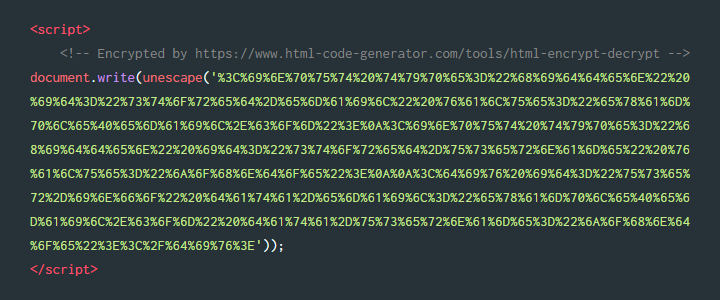
Our HTML encrypt tool uses a combination of algorithms and encoding methods to transform your HTML code into an encrypted format. This format is unreadable to humans and computers without the decryption key
Note: that JavaScript must be enabled in your browser to read and run this encrypted code.
How to Use the HTML Encrypt and Decrypt Tool
- Enter your HTML code into the input field
- Select the encryption or decryption option
- Click the "Encrypt" or "Decrypt" button
- Copy the output code
Protect your HTML by converting it into an encoded format. Paste your code below, choose Normal Encoding or Full Encoding, and click Encrypt to generate the secured version instantly.
Note: Encrypt only the specific HTML snippet you want to protect. Do not include full document elements such as <head> or <body> tags.
Output Format:
Click the "Run Code" button before copying the code. If some text or symbols are not displaying correctly, please try changing the Output Format option.
How to Use the Encrypted Code
Copy the generated encrypted code and paste it into your webpage inside the <body></body> section at the exact location where you want the content to appear.
Paste your encrypted HTML code into the text box below, then click the Decrypt button to restore the original, readable HTML code.
What Is HTML Decryption?
HTML decryption is the process of converting encoded or encrypted HTML back into its original format. It allows you to recover and edit the source code after it has been protected or obfuscated using an encryption method.
The code appears to be encrypted multiple times. Click Decrypt again to fully restore the original HTML. If the result still looks encoded, copy the output and run decryption once more until the readable HTML is revealed.
What is HTML encryption?
HTML encryption is the process of converting HTML code into an encoded format such as JavaScript escape or percent HEX values to protect it from direct copying and make the source harder to read.
What is the difference between Normal Encoding and Full Encoding?
Normal Encoding uses the JavaScript escape method to encode special characters, while Full Encoding converts every character into percent HEX format for stronger obfuscation and protection.
Is HTML encryption secure?
HTML encryption provides obfuscation rather than true security. It helps hide source code from casual viewers, but the browser must still decode it to display the content.
How do I use the encrypted HTML code?
Copy the generated encrypted code and paste it into your webpage inside the body section where you want the content to appear. The browser will decode and display it automatically.
Can I decrypt HTML back to the original code?
Yes, you can paste the encrypted HTML into the Decrypt tool to convert it back into its original readable format instantly.
Does this tool store my HTML code?
No, all encryption and decryption happen directly in your browser. Your HTML code is never uploaded or stored on any server.