Parse CSS Box-Shadow Values to JavaScript Objects
css-box-shadow-parser is a zero-dependency JavaScript library that parses any CSS box-shadow value into structured layer objects - and converts them back to valid CSS with stringify(). It handles multi-layer shadows, inset, hex, rgb(), hsl(), named colors, and full box-shadow: declarations. Use it in shadow editors, design tools, theme builders, and CSS-to-JavaScript workflows in the browser or Node.js.
Table of Contents
What is css-box-shadow-parser?
JavaScript Box Shadow Parser is a zero-dependency library that converts CSS box-shadow values into structured JavaScript layer objects - and back again with stringify(). It supports multi-layer shadows, every CSS color format, and the inset keyword, and runs in both the browser and Node.js.
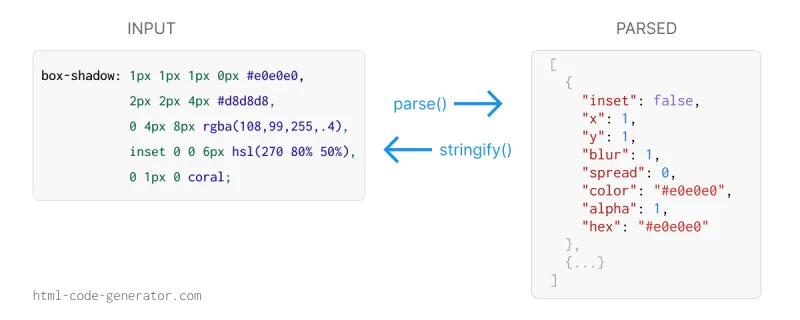
Why use css-box-shadow-parser
Shadow editors, design tools, and theme builders need to read existing CSS, let users tweak individual layers, and write the result back. Parsing box-shadow by hand is error-prone because of comma-separated layers, optional blur/spread, and color functions with commas inside them.
- No dependencies - one JS file, works in browser and Node.
- Multi-layer support - comma splitting respects parentheses in color functions.
- All colors format - hex (3/4/6/8 digit), rgb/rgba, hsl/hsla, named colors, transparent, currentcolor.
- Full declarations - accepts
box-shadow: ...;or raw values. - Resolved color hex + alpha - every layer gets a 6-digit hex and numeric alpha for UI swatches.
- Round-trip stringify - rebuild CSS from edited layer objects.
- inset keyword - detected at the start or end of a layer.
- Helper methods -
split()andparseSingle()for lower-level use.
Features
css-box-shadow-parser Features
- Multi-layer parsing - splits comma-separated shadows into one object per layer.
- Full declaration support - accepts raw values or complete
box-shadow: ...;declarations and strips the property name and semicolon automatically. - All color formats - 3/4/6/8-digit hex,
rgb(),rgba(),hsl(),hsla(), named colors,transparent, andcurrentcolor. - Modern and legacy syntax - handles both comma syntax and the space/slash syntax such as
rgb(0 0 0 / 0.5)andhsl(270 80% 50% / 0.6). - Smart comma splitting - commas inside color functions are never mistaken for layer separators.
- Resolved hex + alpha - every layer returns a normalized 6-digit hex plus a separate alpha value from 0 to 1.
- Inset detection - recognizes the
insetkeyword wherever it appears in the value. - Negative offsets and spread - parses negative x, y, and spread values correctly.
- Graceful handling - CSS-wide keywords like
none,initial, andinheritreturn an empty array. - Zero dependencies - small UMD bundle that works in the browser and Node.js.
Live Demo
Pick a shadow type from the dropdown to see it parsed in real time. The selected CSS box-shadow value is passed to parse() and the resulting layer objects are shown below, along with a live preview box.
Add box shadow code:
Parsed output:
[
  {
    "inset": false,
    "x": 4,
    "y": 4,
    "blur": 10,
    "spread": 0,
    "color": "rgba(0,0,0,0.4)",
    "alpha": 0.4,
    "hex": "#000000"
  }
]
Got the parsed objects? Click Back to CSS to run them through stringify() - the inverse of parse() - and rebuild a valid box-shadow string. This is the full round-trip: read a shadow, edit the values, and write it straight back to CSS.
box-shadow: 4px 4px 10px rgba(0,0,0,0.4);Comparison Table
How css-box-shadow-parser compares with common alternatives.
| Feature | css-box-shadow-parser | Regex splitting | Full CSS parser (PostCSS, etc.) |
|---|---|---|---|
| File size | Tiny (~4 KB) | n/a | Large |
| Dependencies | None | None | PostCSS ecosystem |
| Multi-layer shadows | Yes | Breaks on rgba commas | Yes |
| Color format support | hex, rgb, hsl, named | Manual per format | Full CSS colors |
| Resolved hex + alpha | Yes | Manual | Varies |
| Stringify back to CSS | Yes | Manual | Varies |
| Browser + Node | Yes | Yes | Node-first |
| Focused on box-shadow | Yes | Yes | General CSS |
Installation
Install the package from npm for use in Node.js or any bundler, or drop in the script from a CDN to use it directly in the browser with no build step.
Basic Usage
Parse a shadow value into an array of layer objects:
Return Type
Each parsed layer is a plain object with the following shape. Offsets, blur, and spread are returned as numbers, color keeps the original token, and hex plus alpha give you a normalized color you can use anywhere.
| Property | Type | Description |
|---|---|---|
inset | boolean | true if the shadow uses inset |
x | number | Horizontal offset in px |
y | number | Vertical offset in px |
blur | number | Blur radius in px |
spread | number | Spread radius in px (can be negative) |
color | string | Original CSS color token |
alpha | number | Opacity 0–1 (extracted from color) |
hex | string | Resolved 6-digit hex (e.g. #663399) |
API Reference
The library exposes three functions: parse() for full values, parseSingle() for one shadow token, and split() for tokenizing without parsing.
| Method | Arguments | Returns | Description |
|---|---|---|---|
parse(shadow) | string | Array | Parse a shadow value or full box-shadow: declaration into layer objects. |
stringify(input) | Object or Array | string | Build a CSS shadow string from one layer or an array of layers. |
split(shadow) | string | Array of strings | Split comma-separated layers without parsing each one. |
parseSingle(raw) | string | Object or null | Parse a single layer string. Returns null for invalid input. |
TypeScript Support
The package ships with built-in TypeScript definitions (index.d.ts), so you get full autocomplete and type checking with no @types install required.
import { parse, stringify, BoxShadowLayer } from 'css-box-shadow-parser';

const layers: BoxShadowLayer[] = parse('0 8px 24px rgba(0,0,0,0.4)');

const first: BoxShadowLayer = layers[0];
first.blur;   // number
first.hex;    // string
first.inset;  // boolean

const css: string = stringify(layers);
The exported BoxShadowLayer interface describes every field returned by parse() and parseSingle().
Code Examples
The examples below show the parsed output for common shadow patterns, from named colors and hex with alpha to inset and multi-layer shadows.
Supported Color Formats
Every color format allowed in a CSS box-shadow is recognized and resolved to a hex value with a separate alpha channel.
| Format | Example |
|---|---|
| 3-digit hex | #f00 |
| 4-digit hex + alpha | #f00a |
| 6-digit hex | #ff0000 |
| 8-digit hex + alpha | #ff000066 |
| rgb() comma | rgb(255, 0, 0) |
| rgb() space syntax | rgb(255 0 0) |
| rgba() comma + alpha | rgba(0, 0, 0, 0.5) |
| rgba() space / slash alpha | rgba(0 0 0 / 0.5) |
| hsl() comma | hsl(270, 80%, 50%) |
| hsl() space + slash alpha | hsl(270 80% 50% / 0.6) |
| hsl() deg unit | hsl(200deg 70% 50%) |
| hsla() comma + alpha | hsla(340, 82%, 52%, 0.7) |
| Named color | rebeccapurple, coral, etc. |
| transparent | alpha=0 |
| currentcolor | resolves to #000000 |
Use Cases
Anywhere you need to read, edit, or transform shadows programmatically:
- Shadow editors and generators - parse a pasted value into sliders and color pickers, then
stringify()the result back to CSS. - Design-token and theme tools - convert shadow declarations into JSON tokens for design systems.
- CSS-to-JS pipelines - feed shadow data into canvas, SVG, or React Native styling, which use separate shadow properties.
- Linters and visual diff tools - compare two shadows layer by layer instead of as raw strings.
- Color extraction - pull resolved hex and alpha values out of any shadow for previews or contrast checks.
- Migration scripts - normalize inconsistent shadow syntax across a large codebase.
Browser & Node.js Support
The library is plain ES5-compatible JavaScript in a UMD wrapper, so it runs anywhere with no build step.
| Environment | Support |
|---|---|
| Chrome, Firefox, Safari, Edge | All modern versions |
| Node.js | 14 and above |
| Module systems | CommonJS, browser global, CDN script tag |
| TypeScript | Built-in type definitions |
| Dependencies | None |
FAQ
How do I parse a CSS box-shadow string in JavaScript?
Pass the value to parse(): BoxShadowParser.parse('4px 4px 10px rgba(0,0,0,0.4)'). It returns an array of layer objects, each with inset, x, y, blur, spread, color, alpha, and a resolved hex value. You can pass a raw value or a full box-shadow: ...; declaration.
Does it support multiple shadow layers?
Yes. Comma-separated shadows are split into one object per layer, and commas inside rgba() or hsl() functions are correctly ignored, so multi-layer values parse reliably.
What color formats are supported?
3-, 4-, 6-, and 8-digit hex, rgb(), rgba(), hsl(), hsla() in both comma and space/slash syntax, all named CSS colors, transparent, and currentcolor. Every color resolves to a 6-digit hex plus a separate alpha value.
Does it work in Node.js and the browser?
Yes. The library uses a UMD wrapper, so it works as a CommonJS module in Node.js (require('css-box-shadow-parser')) and as a global BoxShadowParser in the browser via a script tag or CDN.
Does the parser have any dependencies?
No. It is a zero-dependency library released under the MIT license, so you can use it freely in personal and commercial projects.
What happens with keywords like none or inherit?
CSS-wide keywords such as none, initial, inherit, and unset return an empty array, so you can safely call parse() on any computed style value.
What is the difference between parse() and parseSingle()?
Use parse() for a full box-shadow value - it splits on top-level commas, handles one or many layers, accepts complete box-shadow declarations, and always returns an array of layer objects (or an empty array for keywords like none). Use parseSingle() when you already have exactly one shadow layer with no commas - it returns a single object, or null. In short, parse() is the safe default; parseSingle() just skips the array wrapper for a single token.
License
Released under the MIT License - free to use in personal and commercial projects. See the LICENSE file on GitHub for full terms.
Related Tools
Related links