Lightweight JavaScript Draggable Element Library
Make panels, cards, chips, and layout blocks draggable in plain HTML and JavaScript. hcg-draggable is a zero-dependency library (~10 KB minified) built on the Pointer Events API, so mouse, touch, and pen input share one code path. Movement uses CSS transform: translate() for smooth dragging without layout reflow.
On this page you will find live demos, installation (direct download, npm, CDN), a full options reference, data-attribute setup, React and TypeScript notes, and copy-paste examples for handles, containment, grid snap, and revert. Open the full interactive demo page for all ten try-it-yourself examples.
Table of Contents
What is hcg-draggable?
hcg-draggable is a lightweight vanilla JavaScript library for making any element draggable. Call hcgDraggable() on a selector or use a data-hcg-draggable attribute, constrain movement with axis lock and containment, or revert back on release - without React, jQuery, or any other dependency.
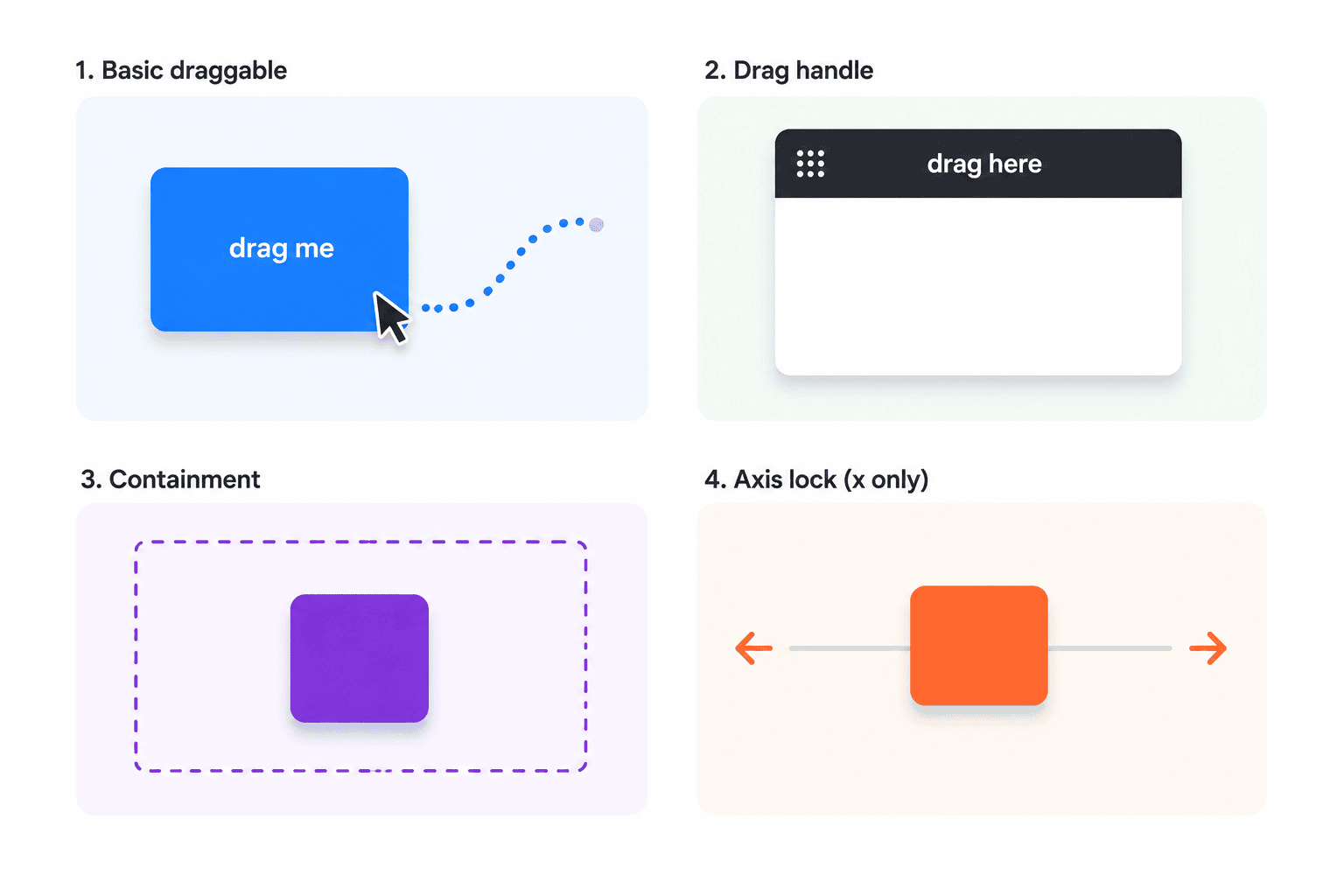
Why use hcg-draggable?
Most drag solutions are either tied to a framework or ship a full sortable / drag-and-drop system when you only need to move panels around. jQuery UI Draggable works, but it depends on jQuery and positions with left/top instead of transform, which can trigger layout reflow on every move.
hcg-draggable fills that gap: a small, dependency-free library built on Pointer Events for mouse, touch, and pen. It suits vanilla pages, React or Vue dashboards, and floating panels without pulling in a heavy toolkit. See the comparison table for how it differs from jQuery UI and hand-rolled scripts, and Features for the full capability list.
Live Demo
Drag the boxes below. Each one shows a different option. For every demo in one place, see the full interactive demo page.
Comparison Table
How hcg-draggable compares with common alternatives.
| Feature | hcg-draggable | jQuery UI draggable | Hand-coded drag |
|---|---|---|---|
| File size | ~10 KB minified (one JS file) | ~90 KB+ (jQuery + jQuery UI) | Varies |
| Dependencies | None | jQuery + jQuery UI | None |
| Touch and pen support | Yes (Pointer Events) | Needs extra plugin | Manual |
| Moves with transform | Yes | No (left/top) | Manual |
| Drag handle | Yes | Yes | Manual |
| Axis lock | Yes | Yes | Manual |
| Grid snapping | Yes | Yes | Manual |
| Containment | Yes | Yes | Manual |
| Bring to front on grab | Yes | No | Manual |
| Revert on release | Yes | Yes | Manual |
Installation
Basic Usage
The quickest way is to add the data-hcg-draggable attribute. Elements with this attribute are made draggable automatically when the page loads.
Or call hcgDraggable() with a target and options. The target can be a CSS selector, a DOM element, or a NodeList. When the selector matches several elements, an array of instances is returned; a single match returns one instance. Calling the factory again on the same element returns the existing instance instead of creating a duplicate.
hcgDraggable("#box", {
axis: null,
handle: ".title-bar",
containment: "parent",
grid: [20, 20],
revert: false,
onEnd: function (e) { console.log(e.x, e.y, e.moved); }
});Features
Everything included in the library at a glance:
- Zero dependencies - one JS file and one CSS file.
- Pointer Events - mouse, touch, and pen through one code path.
- Transform based - smooth dragging with no layout reflow.
- Drag handles - restrict the grab area with a selector.
- Cancel regions - exclude buttons, links, or inputs from starting a drag.
- Drag threshold - require a small move before dragging so clicks still work.
- Click suppression - the click after a real drag is swallowed automatically.
- Axis locking - limit movement to
xory. - Grid snapping - align movement to a step.
- Containment - parent, viewport, an element, or pixel offsets; re-clamped on window resize.
- Bring to front - the grabbed element rises above other draggables.
- Revert - animate back on release when
revert: true. - Runtime options - change any option later with
setOption(). - Data attributes (no per-element JS) -
data-hcg-draggableplus option attributes; auto-init on page load. - Callbacks -
onStart,onMove, andonEndwith position data. - Instance API - enable, disable, setOption, setPosition, contain, reset, and destroy.
- Tiny footprint - ~3 KB minified; works in every modern browser.
Using with React
Create the draggable inside a useEffect hook and clean it up with destroy when the component unmounts.
Try the live React demo on StackBlitz
import { useEffect, useRef } from "react";
import hcgDraggable from "hcg-draggable";
import "hcg-draggable/hcg-draggable.css";
function Panel() {
const boxRef = useRef(null);
const dragRef = useRef(null);
useEffect(() => {
dragRef.current = hcgDraggable(boxRef.current, {
handle: ".bar",
containment: "parent",
onEnd: (e) => console.log("end", e.x, e.y, e.moved)
});
return () => dragRef.current.destroy();
}, []);
return (
<div ref={boxRef}>
<div className="bar">Drag here</div>
<div>Panel content</div>
</div>
);
}Options Reference
| Option | Type | Default | Description |
|---|---|---|---|
| handle | String | null | CSS selector for a child element that starts the drag. When set, only that element is grabbable. |
| cancel | String | null | CSS selector inside the element that must not start a drag, such as buttons, links or inputs. The opposite of handle. |
| dragThreshold | Number | 0 | Pixels the pointer must move before a drag actually starts. A small value (for example 5) lets normal clicks on the element still work. |
| axis | String | null | "x" locks to horizontal, "y" locks to vertical, null allows both directions. |
| containment | String, Element or Object | null | Area to keep the element inside. Accepts "parent", "viewport", a selector, an element, or an object with top, left, right and bottom pixel offsets. |
| grid | Array | null | Snap step as [stepX, stepY] in pixels. |
| disabled | Boolean | false | Create the instance in a disabled state. Call enable() to turn it on. |
| bringToFront | Boolean | true | Raise the element's z-index above other draggables when a drag starts. |
| revert | Boolean | false | Animate back to the start position on release. |
| onStart | Function | null | Called when a drag begins. Receives { x, y, event, target }. |
| onMove | Function | null | Called on every move. Receives { x, y, event, target }. |
| onEnd | Function | null | Called when the drag ends. Receives { x, y, event, target, moved }. |
Instance Methods
The factory returns a draggable instance with the following methods. When the target matches several elements, an array of instances is returned instead.
| Method | Description |
|---|---|
| enable() | Turns dragging on. Returns the instance for chaining. |
| disable() | Turns dragging off without removing listeners. Returns the instance. |
| setOption(name, value) | Changes an option after creation and re-applies side effects (handle, containment, disabled). Returns the instance. |
| getPosition() | Returns the current position as { x, y }. |
| setPosition(x, y) | Moves the element to the given translate position. |
| contain() | Re-clamps the current position inside the containment area. Runs automatically on init and window resize. |
| reset() | Moves the element back to its starting position { x: 0, y: 0 }. |
| destroy() | Removes all listeners and classes. Use this for SPA or framework cleanup. |
Read or set the translate position programmatically:
var d = hcgDraggable("#box");
var pos = d.getPosition();   // { x: 0, y: 0 }
d.setPosition(120, 40);      // move instantly
d.reset();                   // back to { x: 0, y: 0 }
Static methods are available on the factory.
hcgDraggable.init();        // make every [data-hcg-draggable] element draggable
hcgDraggable.destroyAll();  // destroy every active instance
Data Attributes
Every option that takes a simple value can be set straight in the HTML, so you can use the library without writing any JavaScript. Elements carrying data-hcg-draggable are initialized automatically on page load.
| Attribute | Maps to option | Example |
|---|---|---|
| data-hcg-draggable | enables auto-init | data-hcg-draggable |
| data-hcg-handle | handle | data-hcg-handle=".bar" |
| data-hcg-cancel | cancel | data-hcg-cancel="button, input" |
| data-hcg-threshold | dragThreshold | data-hcg-threshold="5" |
| data-hcg-axis | axis | data-hcg-axis="x" |
| data-hcg-containment | containment | data-hcg-containment="parent" |
| data-hcg-grid | grid | data-hcg-grid="20" or "20,40" |
| data-hcg-disabled | disabled | data-hcg-disabled |
| data-hcg-bring-to-front | bringToFront | data-hcg-bring-to-front="false" |
| data-hcg-revert | revert | data-hcg-revert |
Full markup example using several attributes together:
<div
  data-hcg-draggable=""
  data-hcg-handle=".bar"
  data-hcg-containment="parent"
  data-hcg-grid="20">
  <div class="bar">Title bar</div>
  <div>Content</div>
</div>
To initialize elements added to the page later, call hcgDraggable.init() again, or call the factory directly on the new element.
Events
Callbacks are exposed as options. Each one receives a single object with the current position, the original pointer event, and the dragged element.
| Event | Fired when | Argument |
|---|---|---|
| onStart | A drag begins (pointer down on the element or handle). | { x, y, event, target } |
| onMove | The pointer moves during a drag. | { x, y, event, target } |
| onEnd | The drag ends (pointer up or cancel). | { x, y, event, target, moved } |
The x and y values are the current translate offset in pixels. The moved flag is true when the pointer actually moved during the drag.
hcgDraggable("#box", {
  onStart: function (e) { console.log("start", e.x, e.y); },
  onMove:  function (e) { console.log("move",  e.x, e.y); },
  onEnd:   function (e) { console.log("end", e.moved); }
});
Browser Support
hcg-draggable works in all modern browsers that support the Pointer Events API.
| Browser | Supported |
|---|---|
| Google Chrome | Yes |
| Mozilla Firefox | Yes |
| Microsoft Edge | Yes |
| Safari | Yes |
| Opera | Yes |
| Mobile browsers | Yes (touch dragging supported) |
License
Released under the MIT License. Free for personal and commercial use. Copyright HTML Code Generator.
Frequently Asked Questions (FAQ)
Does hcg-draggable have any dependencies?
No. hcg-draggable is plain vanilla JavaScript with zero dependencies. Include hcg-draggable.js and hcg-draggable.css and you are ready to go.
Does hcg-draggable work on touch devices?
Yes. It is built on the Pointer Events API, so mouse, touch, and pen input all work through one code path. Draggable elements set touch-action: none so dragging does not scroll the page accidentally.
Can I limit dragging to one axis or keep an element inside a container?
Yes. Set axis to "x" or "y" to lock movement to one direction. Set containment to "parent", "viewport", a selector, an element, or pixel offsets to keep the element inside an area.
Can I use hcg-draggable with React?
Yes. Create the draggable inside a useEffect hook, keep the returned instance in a ref, and call destroy() in the cleanup function when the component unmounts. See Using with React on this page.
Can I load hcg-draggable from a CDN?
Yes. Add <link> and <script> tags for hcg-draggable.css and hcg-draggable.js from jsDelivr, unpkg, or your own hosted copy, then call hcgDraggable('.selector'). See Installation and CDN usage on this page.