JavaScript Popup Modal (Vanilla JavaScript)
hcg-modal is a lightweight popup modal library for plain JavaScript pages. Add one stylesheet and one script, call hcgModal(), and open dialogs for confirmations, forms, alerts, or any overlay content without jQuery, a framework, or a build step. Everything below is copy-paste ready HTML and JavaScript you can drop into your own site.
Table of Contents
What is hcg-modal?
hcg-modal is a lightweight vanilla JavaScript library for creating popup modal dialogs. It lets you add titles, HTML content, footer buttons, size and position presets, custom width, scroll modes, CSS animations, focus trapping, body scroll lock, layered stacking, back-button close, promise-based results, and your own HTML box as the dialog without jQuery or any framework.
Why use hcg-modal
hcg-modal focuses on being small and practical without pulling in a framework or extra dependencies. Here is what you get out of the box:
- Zero dependencies. Plain JavaScript and CSS - no jQuery, no build step. One small script and one stylesheet.
- Accessible by default. Focus is trapped inside the dialog and restored on close, with
role="dialog",aria-modal, and respect for theprefers-reduced-motionsetting. - Mobile and desktop friendly. An optional back-button close works with the hardware back button and the back gesture, as well as the desktop browser Back button.
- Mobile Back button close. On phones, the hardware or gesture Back button dismisses the modal instead of leaving the page, one layer at a time when modals are stacked.
- Layered stacking. Open modals on top of each other; the Escape key and the back button close them one layer at a time.
- Flexible content. Pass a title, HTML, or your own ready-made box as the entire dialog, with a
.closebutton wired automatically. - Themeable. Restyle with CSS custom properties, set a custom width, or drive animations entirely from your own CSS classes.
- Solid behavior. Body scroll lock, backdrop and Escape close, and a text-selection-safe backdrop so dragging a selection out does not close it.
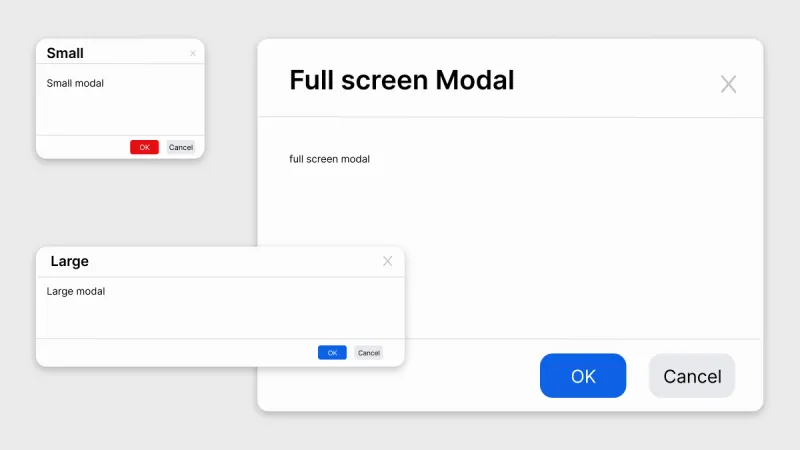
Demo
Try hcg-modal right in your browser. The live examples below let you open real modals and experiment with every feature - sizes, positions, custom width, scroll modes, animations, auto-close timers, layered stacking, and bring-your-own-box dialogs. Click any button to see the modal in action, then copy the matching code straight into your own project.
Sizes
Comparison table
How hcg-modal compares with other common ways to build a modal.
| Feature | hcg-modal | Native <dialog> | Bootstrap modal | Build from scratch |
|---|---|---|---|---|
| Dependencies | None | None | Bootstrap CSS and JS | None |
| Vanilla JavaScript | Yes | Yes | Yes | Yes |
| Focus trap and restore | Yes | Yes | Yes | Do it yourself |
| Backdrop and Escape close | Yes | Escape only | Yes | Do it yourself |
| Back button / gesture close | Yes | No | No | Do it yourself |
| Layered stacking | Yes | Manual | Limited | Do it yourself |
| Footer buttons API | Yes | No | Markup only | Do it yourself |
| Bring your own box | Yes | Yes | Markup only | Yes |
| Custom width option | Yes | CSS only | Preset sizes | CSS only |
| CSS-class animations | Yes | CSS only | Built in | Do it yourself |
| Respects reduced motion | Yes | N/A | Partial | Do it yourself |
Installation
Include the stylesheet and the script. The script adds a single global function, hcgModal(). There is no build step and no dependencies.
<link rel="stylesheet" href="hcg-modal.css">
<script src="hcg-modal.js"></script>
Or install it from npm:
npm install hcg-modalSource code and package:
Basic usage
Call hcgModal() with options. It returns an instance with open() and close() methods.
const modal = hcgModal({
  title: 'Hello',
  content: '<p>This is a popup modal.</p>',
  buttons: [
    { text: 'Close', type: 'secondary', onClick: m => m.close() }
  ]
});

modal.open();Open a popup modal on button click:
<button type="button" id="open-popup">Open popup</button>// Create the modal once, then reuse it on every click.
const modal = hcgModal({
title: 'Popup Title',
content: '<p>This is a popup modal.</p>',
buttons: [
{ text: 'Close', type: 'secondary', onClick: m => m.close() }
]
});
document.getElementById('open-popup').addEventListener('click', () => modal.open());
Features and options
hcg-modal is a small, dependency-free popup modal for vanilla JavaScript. Below are the features and options you can mix and match - sizing, positioning, animations, scrolling, close behaviors, promises, timers, theming, and more.
Options reference
All options are optional. Pass them in a single object to hcgModal().
| Option | Default | Description |
|---|---|---|
| title | '' | Header title (HTML or text). Omit to hide the header. |
| content | '' | Body content: HTML string, text, or a DOM node. |
| size | 'medium' | small, medium, large, or fullscreen. |
| width | null | Custom width overriding the size preset. Number (px) or CSS length string. |
| position | 'center' | center, top, or bottom. |
| scrollBody | true | true: header and footer pinned, body scrolls. false: whole dialog scrolls. |
| closeOnBackdrop | true | Close when the backdrop is clicked. |
| closeOnEsc | true | Close when the Escape key is pressed. |
| closeOnBackButton | false | Close when the browser or mobile back button is pressed. |
| showClose | true | Show the header close (X) button. |
| className | '' | Extra class(es) on the overlay, for animation and theming. |
| box | null | Use your own element or HTML as the entire dialog. |
| buttons | null | Array of { text, type, onClick(instance) } footer buttons. |
| onOpen | null | Callback fired after the modal opens. |
| onClose | null | Callback fired when the modal closes. |
Instance methods
hcgModal() returns an instance with these methods.
| Method | Description |
|---|---|
| open() | Open the modal. Returns the instance (chainable). |
| opened() | Open the modal and return a Promise that resolves when it closes, to the clicked button's value (or undefined when dismissed). |
| close(reason) | Close the modal. reason is optional and passed to beforeClose. |
| setContent(html|node) | Replace the body content. A DOM node is moved in - clone it first if it must stay on the page. |
| setTitle(html) | Replace the header title (creates the header if it was omitted). |
| isOpen() | Returns whether the modal is currently open. |
| destroy() | Immediately remove the modal and detach listeners. Unlike close(), it does not run beforeClose, play the exit animation, or fire onClose. |
const modal = hcgModal({ title: 'Demo', content: 'Hello' });

modal.open();                          // open the modal
modal.close();                         // close the modal
modal.setContent('<p>New body</p>');   // replace the body content
modal.setTitle('New title');           // replace the header title
modal.isOpen();                        // returns true or false
modal.destroy();                       // remove the modal and its listeners
Callbacks
The onOpen and onClose options run at the two ends of a modal's life. onOpen fires right after the modal is shown and focus has moved inside it; onClose fires when it starts to close. Both receive the modal instance, so you can read its state or run setup and cleanup.
hcgModal({
  title: 'Settings',
  content: '<p>Adjust your preferences.</p>',
  onOpen: (modal) => {
    console.log('opened:', modal.isOpen());   // true
    // focus a field, start a player, load data, etc.
  },
  onClose: (modal) => {
    console.log('closed');
    // save state, stop timers, send analytics, etc.
  }
}).open();Events and close reasons
hcg-modal uses callback hooks rather than DOM events. Across a single open/close cycle they fire in a predictable order:
onOpen(instance)- after the modal opens and focus moves inside it.beforeClose(reason)- before any close; returnfalse(or a promise resolving tofalse) to cancel it.- button
onClick(instance)- when a footer button is clicked, if the button defines one. onClose(instance)- when the modal closes.
The beforeClose callback receives a reason string telling you what triggered the close:
| reason | Triggered by |
|---|---|
| button | A footer button that has no custom onClick. |
| backdrop | Clicking the backdrop behind the dialog. |
| escape | Pressing the Escape key. |
| close-button | The header X button, or a .close / data-hcg-close element. |
| back | The browser or mobile back button (with closeOnBackButton). |
| timer | The auto-close timer elapsing. |
| api | Calling close() in your own code with no reason. |
hcgModal({
  content: '<p>Watch the console when you close this.</p>',
  beforeClose: (reason) => {
    console.log('closing because:', reason);   // e.g. 'escape' or 'backdrop'
    return true;                               // false would keep it open
  }
}).open();Accessibility
hcg-modal is accessible by default. The dialog uses role="dialog" and aria-modal="true". Focus is trapped inside the open modal and restored to the previously focused element on close. Escape closes the modal when closeOnEsc is enabled. Built-in animations honor prefers-reduced-motion.
When a modal has no visible title, give it an accessible name with ariaLabel or point to a heading with ariaLabelledBy (the id of an element inside the dialog). ariaLabelledBy takes precedence over ariaLabel.
hcgModal({
  content: '<p>Your session expired.</p>',
  ariaLabel: 'Session expired',
  buttons: [{ text: 'OK', onClick: m => m.close() }]
}).open();

hcgModal({
  content: '<h2 id="dlg-title">Settings</h2><p>…</p>',
  ariaLabelledBy: 'dlg-title',
  showClose: false
}).open();
Security
The title and content options accept HTML strings and insert them as markup (content also accepts a DOM node). Never pass unsanitized user input to them, or you risk cross-site scripting (XSS). Button labels (buttons[].text) are inserted as plain text and are safe. Sanitize any user-derived HTML before passing it in, or pass a DOM node you built yourself.
Using with React
A thin React wrapper reuses the same vanilla modal and renders your React children into the dialog through a portal, so there is no second implementation to maintain. Load the vanilla hcg-modal.css and hcg-modal.js first, then use the controlled open prop.
import { useState } from 'react';
import 'hcg-modal/hcg-modal.css';   // modal styles
import 'hcg-modal/hcg-modal.js';    // defines window.hcgModal
import HcgModal from 'hcg-modal/react';

function Example() {
  const [open, setOpen] = useState(false);

  return (
    <>
      <button onClick={() => setOpen(true)}>Open modal</button>

      <HcgModal open={open} onClose={() => setOpen(false)} title="Edit profile">
        <p>Real React children render here.</p>
        <button onClick={() => setOpen(false)}>Done</button>
      </HcgModal>
    </>
  );
}
The open prop controls visibility and onClose fires for every close path (X button, Escape, backdrop, back button, or a .close element). Any other option - size, width, position, scrollBody, closeOnBackButton, className, and so on - is passed straight through as a prop.
<HcgModal
  open={open}
  onClose={() => setOpen(false)}
  size="large"
  width={600}
  position="top"
  closeOnBackButton
>
  ...
</HcgModal>
Browser support
hcg-modal runs in all modern evergreen browsers and uses only standard DOM and CSS features - CSS custom properties, CSS transitions, and the History API for the optional back-button close. There are no polyfills to load.
| Browser | Supported |
|---|---|
| Chrome / Edge (Chromium) | Yes |
| Firefox | Yes |
| Safari (desktop and iOS) | Yes |
| Opera | Yes |
| Internet Explorer | No |
Frequently Asked Questions (FAQ)
Is hcg-modal free to use?
Yes. hcg-modal is open source under the MIT license and free to use in both personal and commercial projects.
Does hcg-modal have any dependencies?
No. It is written in plain JavaScript and CSS with no jQuery, no framework, and no build step. You include one stylesheet and one script.
How do I get the result of which button was clicked?
Open the modal with opened() instead of open(). It returns a promise that resolves to the clicked button's value, or to undefined when the modal is dismissed with Escape, the backdrop, the X button, or the back button.
How do I stop the modal from closing?
Use the beforeClose option. Return false (or a promise that resolves to false) to cancel the close - for example to confirm unsaved changes before letting the modal close.
Can I use hcg-modal with React?
Yes. A thin React wrapper renders your React children into the same vanilla modal through a portal, controlled by an open prop, so there is no second implementation to maintain.
Is hcg-modal accessible?
Yes. Focus is trapped inside the dialog and restored on close, the dialog uses role="dialog" and aria-modal, Escape closes it, and animations respect the prefers-reduced-motion setting.
Which browsers does hcg-modal support?
All modern evergreen browsers, including Chrome, Edge, Firefox, Safari on desktop and iOS, and Opera. Internet Explorer is not supported.
License
hcg-modal is open source under the MIT license. Copyright HTML Code Generator.
Related
Related links: