Lightweight JavaScript Confetti Cannons Library - Celebration Fireworks
Celebrate form completions, game milestones, and marketing moments with canvas confetti bursts in plain HTML and JavaScript. hcg-confetti-cannons is a zero-dependency library with directional cannon origins, angle and spread control, built-in celebration presets, scoped canvas instances, and Promise-based chaining - without React, jQuery, or any other dependency.
On this page you will find live demos, installation (direct download, npm, CDN), a full options and API reference, and copy-paste examples for dual cannons, presets, and custom canvas rendering. Open hcg-confetti-cannons demo page for click-to-fire, custom options, and a scoped canvas demo.
Table of Contents
What is hcg-confetti-cannons?
hcg-confetti-cannons is a vanilla JavaScript library for canvas-based confetti effects. Call confetti() to launch a burst of colorful particles from a cannon origin, control launch angle and spread, chain multiple cannons with Promise.all(), or use presets like confetti.celebrate() - without React, jQuery, or any other dependency.
Why use hcg-confetti-cannons?
Confetti fits short celebratory moments that reward user actions without blocking the UI. Use hcg-confetti-cannons when you want lightweight visual feedback instead of heavy animation libraries or video assets.
For form saves, game achievements, onboarding milestones, and seasonal themes, a small canvas burst is often enough. Pair confetti with a toast notifications or status message so success is not communicated by animation alone.
Live Demo
Click a button for a quick sample, try dual cannons, click-to-fire, vector shapes, emojis, and custom text below, or tune every option in the playground. For scoped canvas and every demo on one page, open the interactive hcg-confetti-cannons demo page.
Comparison Table
How hcg-confetti-cannons compares with popular confetti libraries.
| Feature | hcg-confetti-cannons | canvas-confetti | react-confetti |
|---|---|---|---|
| Dependencies | None | None | Requires React |
| Approximate size | One small JS file | One small JS file | React component + peer deps |
| Framework requirement | None (script tag friendly) | None | React only |
| Directional cannons | origin, angle, spread | Yes | Continuous rain, not cannon-style bursts |
| Built-in presets | celebrate, fireworks, schoolPride | Manual sequences | No presets |
| Emoji particles | emojis option and confetti.emoji() | Yes | No |
| Custom text particles | texts option and confetti.text() | No | No |
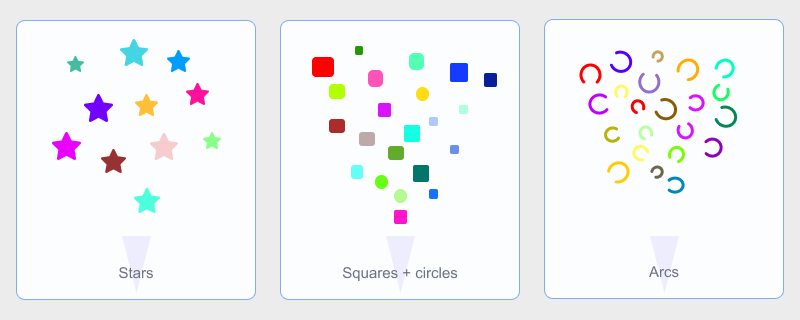
| Vector shapes | star, arc, curl plus squares and circles | Squares and circles | Rectangles only |
| Scoped canvas | confetti.create(canvas) | confetti.create() | Renders inside a React component |
| Reduced motion | Opt in with disableForReducedMotion: true | Manual | Manual |
| TypeScript | Definitions included | Community types | Built-in types |
| License / cost | Free, MIT | Free, ISC | Free, MIT |
Choose hcg-confetti-cannons when you want a familiar canvas-confetti-style API with built-in celebration presets, emoji bursts, custom text labels, extra vector shapes, and zero dependencies in vanilla pages or React apps. Use react-confetti when you only need a continuous confetti rain inside a React tree and do not need directional cannon bursts.
Features
Everything included in the library at a glance:
- Zero dependencies - one small JavaScript file.
- Script tag or bundler - works with a plain script tag, CommonJS, or ESM.
- Familiar API -
confetti(options)with Promise return values. - Directional cannons - tune
origin,angle, andspread. - Built-in presets -
celebrate,fireworks, andschoolPride. - Scoped rendering -
confetti.create(canvas)for element-bound bursts. - Immediate reset -
confetti.reset()clears all active particles. - Reduced motion - optional skip when
disableForReducedMotion: true. - TypeScript - definitions ship with the package.
- React-friendly - call from handlers or bind a scoped canvas in
useEffect.
Installation
Basic Usage
Install hcg-confetti-cannons, then fire a burst from your page script. origin.x and origin.y are normalized from 0 to 1 relative to the viewport (or the custom canvas when using confetti.create()).
Custom Canvas Instance
By default, the library creates a full-page fixed canvas overlay. To render inside a specific element, pass your own <canvas>:
<canvas id="party-canvas" width="600" height="400" style="border:solid 1px #aaa"></canvas>const canvas = document.getElementById('party-canvas');
const party = confetti.create(canvas, { resize: true });
party({ particleCount: 80, spread: 80, origin: { x: 0.5, y: 0.8 } });
// party.reset();
// party.destroy();Each instance has its own particle pool and animation loop. The default singleton is unaffected.
Using with React
Import confetti from the package and call it from event handlers. No instance setup is required for full-page bursts. For a scoped canvas, create the instance in useEffect and call destroy() when the component unmounts.
Try the live React demo on StackBlitz
Presets such as confetti.celebrate() and confetti.fireworks() work the same way from handlers. Each burst returns a Promise if you need to chain animations after the particles finish.
Options Reference
Pass these as the argument to confetti(options) or scoped instance calls.
| Option | Type | Default | Description |
|---|---|---|---|
| particleCount | number | 50 | Number of particles per burst |
| angle | number | 90 | Launch angle in degrees (90=up) |
| spread | number | 45 | Spread arc in degrees |
| startVelocity | number | 38 | Initial particle speed |
| decay | number | 0.91 | Velocity multiplier per frame |
| gravity | number | 0.75 | Downward acceleration per frame |
| drift | number | 0 | Horizontal drift per frame |
| ticks | number | 300 | Particle lifetime in frames |
| scalar | number | 1 | Particle size multiplier |
| zIndex | number | 100 | Overlay canvas z-index (default instance only) |
| colors | string[] | 7-color palette | Hex colors for shape particles, or fill color when using emojis or texts |
| shapes | square | circle | star | arc | curl | square, circle | Particle shapes; star is filled, arc and curl are stroked curves. Ignored when emojis is set. |
| emojis | string[] | none (uses shapes) | Emoji characters rendered as particles instead of shapes. confetti.emoji() defaults to ['🎉', '🎊', '✨', '🎈', '🥳']. |
| texts | string[] | none (uses shapes) | Short text labels rendered as particles; use with confetti.text(). Defaults to YAY, WOW, GO. Tint each word with colors. |
| origin | { x, y } | { 0.5, 0.5 } | Normalized cannon origin |
| flat | boolean | false | When true, disables tilt and wobble |
| disableForReducedMotion | boolean | false | When true, skip animation if user prefers reduced motion |
API Reference
All methods are on the default confetti export. Each burst returns a Promise that resolves when particles finish. Chain follow-up code with .then().
| Method | Description |
|---|---|
| confetti(options?) | Fire a burst; returns a Promise |
| confetti.fire(options?) | Alias for confetti() |
| confetti.reset() | Clear all particles on the default canvas |
| confetti.create(canvas?, options?) | Create a scoped instance bound to a canvas |
| confetti.celebrate(options?) | Multi-cannon celebration preset |
| confetti.fireworks(options?) | Random-origin fireworks preset; returned Promise has .stop() |
| confetti.schoolPride(options?) | Dual corner cannon preset |
| confetti.emoji(options?) | Emoji particle burst (default emoji set when omitted) |
| confetti.text(options?) | Short text particle burst (default labels when omitted) |
| confetti.version | Library version string (read-only) |
Scoped instances expose (options), fire(), reset(), and destroy().
Accessibility
Confetti is decorative animation. By default, bursts run for all users. Set disableForReducedMotion: true on a call (or in your shared options) to skip rendering when the user has prefers-reduced-motion: reduce enabled.
Avoid relying on confetti alone to communicate success. Pair bursts with visible text feedback such as a notification or status message.
Browser Support
Works in all modern browsers that support canvas and requestAnimationFrame: Chrome, Firefox, Safari, Edge, and current mobile browsers. No polyfills required.
License
Released under the MIT License. Free for personal and commercial use. Copyright HTML Code Generator.
Frequently asked questions
Does this confetti library have any dependencies?
No. It is plain vanilla JavaScript with zero dependencies. Include hcg-confetti-cannons.js and call confetti() from your page script.
Can I fire confetti from a specific point on the page?
Yes. Pass origin with normalized x and y values between 0 and 1. For example, origin: { x: 0.5, y: 0.7 } fires from the horizontal center near the bottom of the viewport.
Does the library respect prefers-reduced-motion?
Yes. When disableForReducedMotion is true and the user has reduced motion enabled, confetti() resolves immediately without drawing particles.
Can I render confetti inside a specific element?
Yes. Use confetti.create(canvasElement, { resize: true }) to get a scoped instance that draws only on your canvas instead of the full-page overlay.
Are there built-in celebration presets?
Yes. confetti.celebrate(), confetti.fireworks(), and confetti.schoolPride() provide ready-made multi-burst sequences for common celebration effects.
Can I use hcg-confetti-cannons with React?
Yes. Import confetti and call it from event handlers for one-shot bursts. For a scoped canvas, create the instance inside useEffect and call destroy() in the cleanup function when the component unmounts. See React usage on this page.
Does confetti() return a Promise?
Yes. Each burst returns a Promise that resolves when all particles from that burst have finished animating. Use Promise.all() to wait for multiple cannons.
Related
Related links