Lightweight JavaScript Sortable Drag and Drop Library
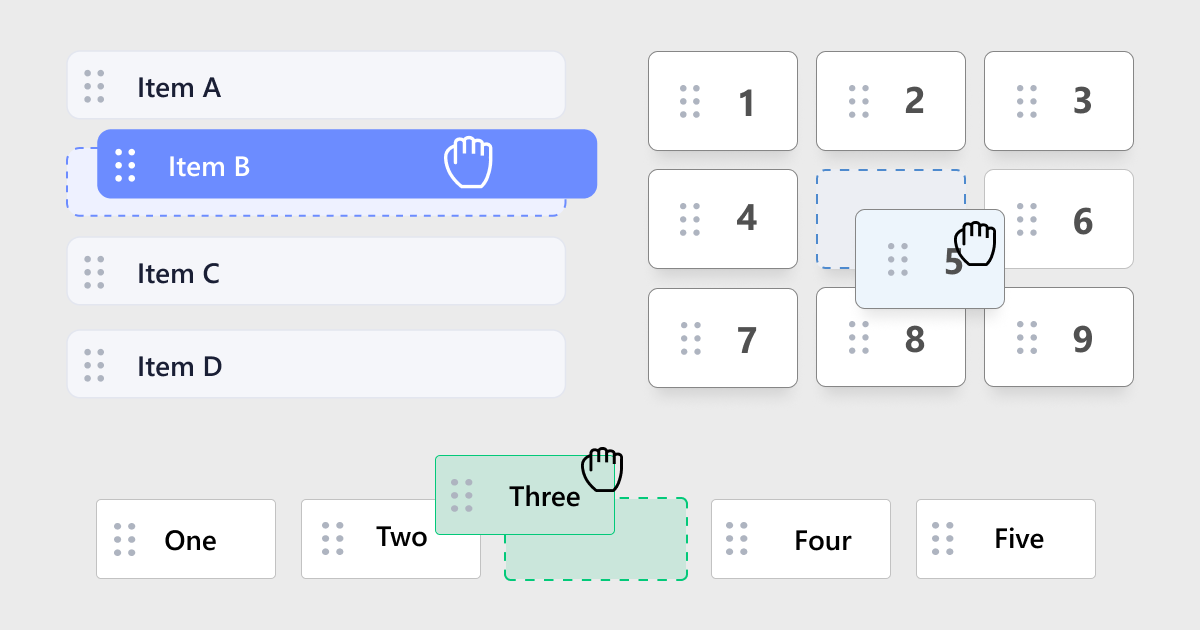
Reorder lists, horizontal rows, grids, and kanban-style boards in plain HTML and JavaScript. hcg-sortable is a zero-dependency library built on the Pointer Events API, so mouse, touch, and pen input share one code path. It supports connected lists, drag handles, custom placeholders, FLIP sibling animation, and edge auto-scroll without jQuery or a framework.
On this page you will find live demos, installation (direct download, npm, CDN), a full options reference, React notes, and copy-paste examples for connected lists, handles, placeholders, and callbacks. Open the full interactive demo page for all nine try-it-yourself examples.
Table of Contents
What is hcg-sortable?
hcg-sortable is a lightweight vanilla JavaScript library for making lists, rows, and grids reorderable. Call new HcgSortable() on a container, constrain sorting with axis modes and handles, move items between connected lists with group, and read the new order with toArray() - without React, jQuery, or any other dependency.
Why use hcg-sortable?
Most sortable solutions are either tied to a framework or ship as part of a large drag-and-drop toolkit when you only need to reorder DOM children. jQuery UI Sortable works, but it depends on jQuery and jQuery UI, and touch support needs extra plugins.
hcg-sortable fills that gap: a small, dependency-free library built on Pointer Events for mouse, touch, and pen. It suits vanilla pages, React or Vue dashboards, todo lists, kanban boards, and builder UIs without pulling in a heavy toolkit. See the comparison table for how it differs from jQuery UI Sortable and native HTML drag and drop, and Features for the full capability list.
Live Demo
Drag the items below. Each block shows a different option. For every demo in one place, see the full interactive demo page.
Comparison Table
How hcg-sortable compares with common alternatives.
| Feature | hcg-sortable | jQuery UI Sortable | Native HTML Drag and Drop |
|---|---|---|---|
| Dependencies | None | jQuery + jQuery UI | None |
| Touch and pen support | Yes (Pointer Events) | Needs extra plugin | Inconsistent |
| Sortable lists and grids | Built in | Lists built in, grids need extra work | Requires custom logic |
| Connected lists | Built in with group | Built in with connectWith | Requires custom logic |
| Drag handles | Yes | Yes | Manual |
| Custom placeholders | Yes | Limited | Manual |
| FLIP sibling animation | Yes | Yes | Manual |
| Auto-scroll | Yes | Yes | Manual |
| Framework requirement | None | Requires jQuery | None |
Installation
Basic Usage
Create a container with child elements, then pass the container selector or element to new HcgSortable().
<ul id="todo-list" class="list">
<li class="item" data-id="one">One</li>
<li class="item" data-id="two">Two</li>
<li class="item" data-id="three">Three</li>
</ul>
const sortable = new HcgSortable('#todo-list', {
axis: 'y',
animation: 150,
onUpdate(detail) {
console.log('Moved from', detail.oldIndex, 'to', detail.newIndex);
}
});Features
Everything included in the library at a glance:
- Zero dependencies - one JS file and one CSS file.
- Pointer Events - mouse, touch, and pen through one code path.
- Axis modes - vertical list, horizontal row, 2D grid, or automatic layout detection.
- Connected lists - move items between containers with
group. - Drag handles - restrict the grab area with a selector.
- Cancel regions - exclude buttons, links, or inputs from starting a drag (jQuery UI Sortable compatible).
- zIndex - control floated item stacking while dragging.
- Cursor - configurable item cursor; disabled lists use the default arrow.
- Custom placeholders - generated gap, HTML string, class name, or disabled.
- FLIP animation - smooth sibling reordering with configurable duration.
- Auto-scroll - edge scrolling for scrollable containers or the page.
- Containment - constrain the dragged item to a parent or element.
- Drag threshold - require a small move before dragging begins.
- Callbacks -
onStart,onMove,onAdd,onRemove,onUpdate, andonEnd. - Instance API - enable, disable, option, setOption, toArray, and destroy.
- UMD friendly - works from a script tag, CommonJS, AMD, or as a global
HcgSortableclass.
Using with React
Create the sortable inside a useEffect hook and clean it up with destroy() when the component unmounts.
import { useEffect, useRef } from "react";
import HcgSortable from "hcg-sortable";
import "hcg-sortable/hcg-sortable.css";
function SortableList() {
const listRef = useRef(null);
useEffect(() => {
const sortable = new HcgSortable(listRef.current, {
axis: "y",
animation: 150,
onUpdate(detail) {
console.log(detail.oldIndex, detail.newIndex);
}
});
return () => sortable.destroy();
}, []);
return (
<ul ref={listRef}>
<li data-id="one">First</li>
<li data-id="two">Second</li>
<li data-id="three">Third</li>
</ul>
);
} If React state owns the list data, update that state inside onUpdate, onAdd, or onRemove so the rendered order stays in sync with the DOM.
Options Reference
All options
| Option | Type | Default | Description |
|---|---|---|---|
| group | String, Object, or null | null | Connects lists for moving items between containers. Object form: { name, pull, put }. |
| handle | String or null | null | CSS selector for a child element inside each item that starts the drag. |
| cancel | String or null | null | CSS selector for child elements that must not start a drag (jQuery UI Sortable compatible). |
| axis | String | 'y' | 'x', 'y', 'grid', or 'auto'. Controls drop-slot detection direction. |
| className | String | 'hcg-sortable-drag' | Class added to the item while it is being dragged. |
| placeholder | Boolean or String | true | Generated placeholder, HTML string, custom class name, or false to disable. |
| animation | Number | 150 | FLIP sibling animation duration in milliseconds. Use 0 to disable. |
| scroll | Boolean or Element | true | Enables edge auto-scroll for the nearest scrollable container, page, or a provided element. |
| containment | String, Element, Object, or null | null | Constrains the dragged item to a parent, element, or coordinate rectangle. |
| dragThreshold | Number | 4 | Pointer movement in pixels required before dragging begins. |
| disabled | Boolean | false | Disables sorting when set to true. |
| cursor | String or false | 'grab' | Cursor on items when enabled. Use false to manage cursors in your own CSS. Disabled lists use default. |
| zIndex | Number | 1000 | Stacking order of the floated item while dragging. |
| onStart | Function or null | null | Fires when a drag starts. |
| onMove | Function or null | null | Fires while the placeholder moves to a new slot. |
| onAdd | Function or null | null | Fires on the list that receives an item from another connected list. |
| onRemove | Function or null | null | Fires on the list that loses an item to another connected list. |
| onUpdate | Function or null | null | Fires when item order or list placement changes. |
| onEnd | Function or null | null | Fires when the drag interaction ends. |
Pass these as the second argument to new HcgSortable(element, options). After creation, read or change any option with option(name) (getter) or option(name, value) / setOption(name, value) (setter).
Getter and setter
Every option in the table below supports runtime get and set on the instance:
const sortable = new HcgSortable('#list', {
  axis: 'y',
  animation: 150
});

// Getter — one argument returns the current value
sortable.option('axis');       // 'y'
sortable.option('animation');  // 150
sortable.option('group');      // null, or the object/string you set

// Setter — two arguments update the option (returns the instance for chaining)
sortable.option('animation', 0);
sortable.setOption('dragThreshold', 20);  // jQuery UI Sortable-style alias

sortable
  .setOption('cursor', 'move')
  .setOption('zIndex', 2000);

sortable.setOption('group', {
  name: 'workflow',
  pull: true,
  put: false
});

// Prefer enable() / disable() for sorting on/off; option('disabled') also works
sortable.option('disabled', true);
sortable.enable();
option('filter', value) is accepted as a legacy alias for cancel. Setting animation normalizes true (default ms), false or 0 (off), or a positive number. Setting group, cursor, or disabled updates internal state immediately (connected-list rules, cursor CSS, etc.).
Instance Methods
The constructor returns a sortable instance with the following methods.
| Method | Description |
|---|---|
| toArray() | Returns the current order as an array of data-id values (or indices when no data-id is set). |
| option(name) | Gets an option value. |
| option(name, value) | Sets an option value. Returns the instance for chaining. |
| setOption(name, value) | Alias for option(name, value). |
| enable() | Turns sorting on. Returns the instance. |
| disable() | Turns sorting off without removing listeners. Returns the instance. |
| destroy() | Removes all listeners and classes. Use this for SPA or framework cleanup. |
Read the library version from the static property: console.log(HcgSortable.version);
Callbacks
Pass lifecycle hooks as option functions. Each callback receives one argument, detail, and this is the HcgSortable instance the callback belongs to (the list that registered the option).
CSS Classes
hcg-sortable adds a few class names you can target for styling. The drag class can be changed with the className option.
| Class | Applied to |
|---|---|
| hcg-sortable | The container element the instance is attached to. |
| hcg-sortable-drag | The item currently being dragged (configurable via className). |
| hcg-sortable_placeholder | The generated placeholder shown at the drop position. |
| hcg-sortable-dragging | Added to body during a drag to force a grabbing cursor. |
Browser Support
hcg-sortable works in all modern browsers that support the Pointer Events API, CSS transforms, and requestAnimationFrame.
| Browser | Supported |
|---|---|
| Google Chrome | Yes |
| Mozilla Firefox | Yes |
| Microsoft Edge | Yes |
| Safari | Yes |
| Opera | Yes |
| Mobile browsers | Yes (touch sorting supported) |
License
Released under the MIT License. Free for personal and commercial use. Copyright HTML Code Generator.
Frequently Asked Questions (FAQ)
Does hcg-sortable have any dependencies?
No. hcg-sortable is plain vanilla JavaScript with zero dependencies. Include hcg-sortable.js and hcg-sortable.css and you are ready to go.
Does hcg-sortable work on touch devices?
Yes. It is built on the Pointer Events API, so mouse, touch, and pen input all work through one code path.
Can hcg-sortable move items between connected lists?
Yes. Lists can share a group name and use pull and put settings to allow or restrict transfers between containers.
Can I use hcg-sortable with React?
Yes. Create the HcgSortable instance inside a useEffect hook, keep a ref to the container element, and call destroy() in the cleanup function when the component unmounts. See the Using with React section on this page.
Can I load hcg-sortable from a CDN?
Yes. Add link and script tags for hcg-sortable.css and hcg-sortable.js from jsDelivr, unpkg, or your own hosted copy, then call new HcgSortable('.selector'). See Installation and CDN usage on this page.
Do connected lists need a minimum height?
Yes. When a connected list becomes empty, its container collapses to zero height and cannot receive drops. Set min-height on each list container with CSS, or set minHeight in JavaScript during drag when a list is empty.
Related
Related links